
Architecture
AtGlance has two parts that work together:
- the Management Console, which you host (Docker containers, one per organization);
- the
atglanceCLI and agent, one small binary on every server you manage.
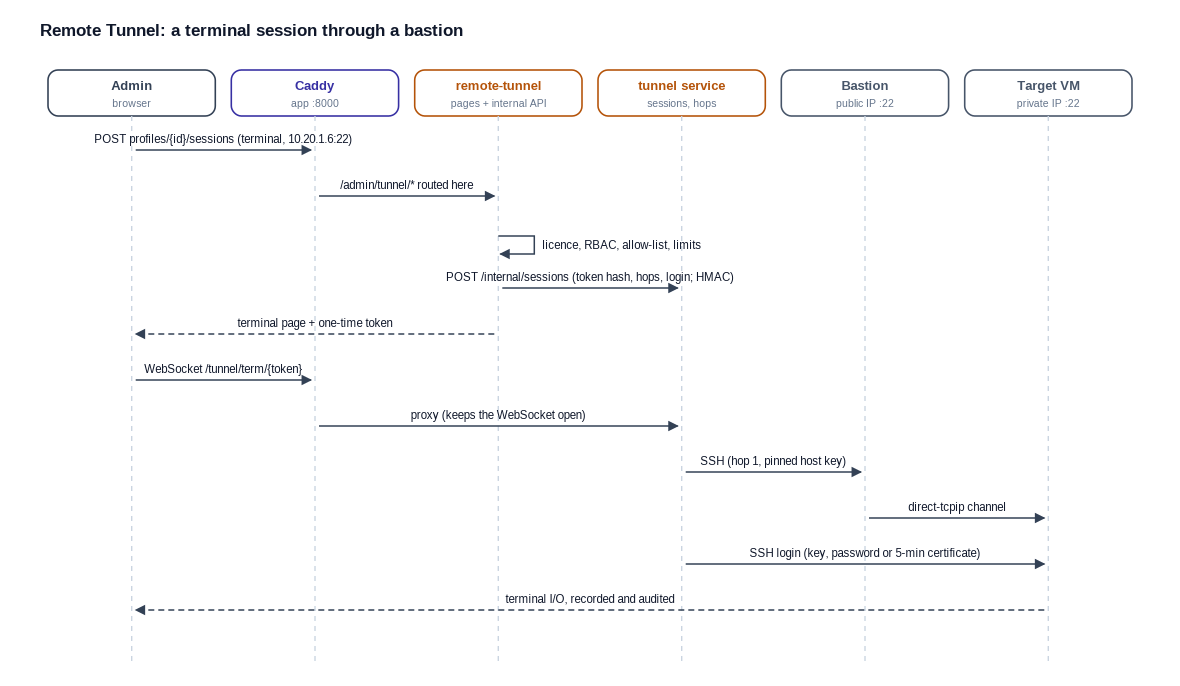
Every connection starts from the server: the CLI and the agent connect out to the console, so no inbound port is opened on your servers. The only exception is Remote Tunnel, where the console connects to servers through a profile you set up (Direct, a bastion hop or a connector).
The Management Console
| Part | What it does |
|---|---|
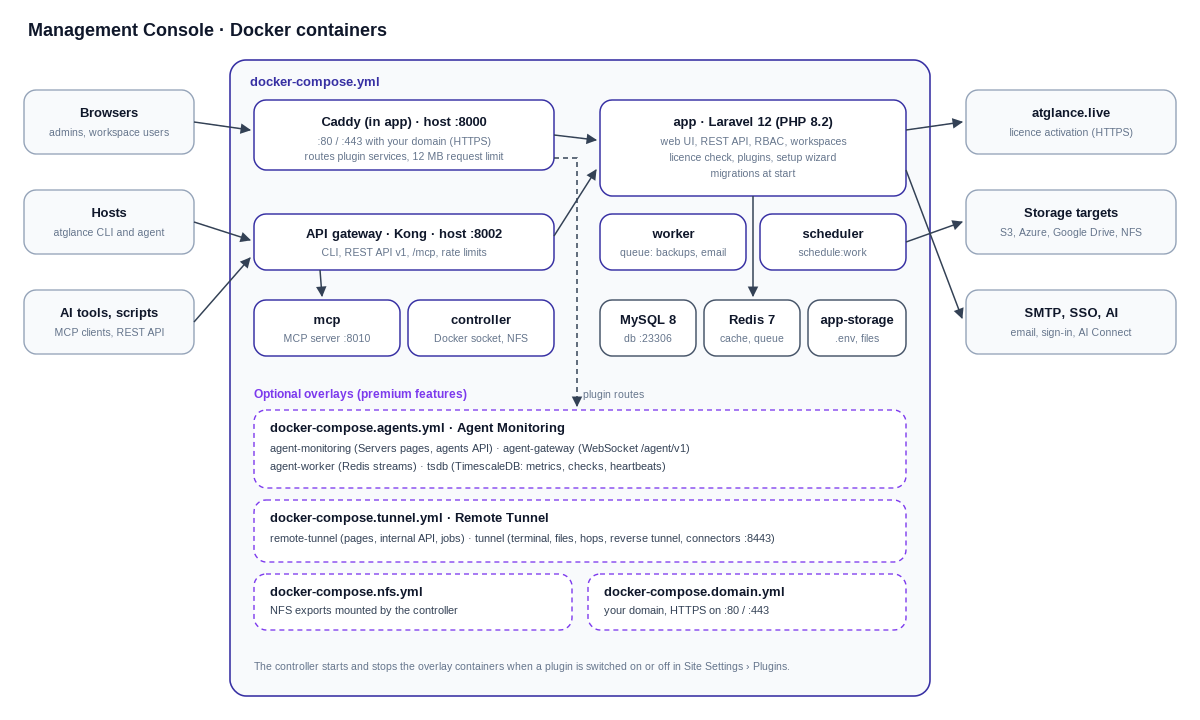
Caddy (in app) |
The front door on host port 8000 (and 80/443 with your domain). Limits request sizes and sends the paths of plugin services (Servers pages, Remote Tunnel pages) to their containers |
| app | Laravel 12 on PHP 8.2: the web console, the REST API (/api/v1), roles and workspaces, the licence check, plugins and the setup wizard. Runs the database migrations when it starts |
| worker and scheduler | Queued jobs (backups, email, notifications) and scheduled tasks |
| Kong API gateway | Host port 8002: the atglance CLI, scripts and the MCP server (/mcp) come in here, with rate limits |
| controller | The only container with the Docker socket. Answers a fixed set of calls: start and stop the MCP, Agent Monitoring and Remote Tunnel containers, mount NFS exports |
| MySQL 8, Redis 7 | Data, cache and queue. Inside the Docker network only |
| app-storage volume | .env with APP_KEY, configuration files, backups, the licence file |
Optional overlays add containers for premium features. They use the same images and are switched on and off in Site Settings › Plugins:
- Agent Monitoring (
docker-compose.agents.yml):agent-monitoring(the Servers pages and the agents API),agent-gateway(the agents' WebSocket),agent-workerandtsdb(TimescaleDB). - Remote Tunnel (
docker-compose.tunnel.yml):remote-tunnel(its pages, internal API and jobs) andtunnel(terminal, files, port forwards, bastion hops, connectors and the reverse tunnel).
If an optional service is down, its pages say so and the rest of the console keeps working.
Outbound from the console: atglance.live (licence activation), your storage targets (S3, Azure Blob, Google Drive, NFS), SMTP and single sign-on providers.
The CLI and the agent
| Part | What it does |
|---|---|
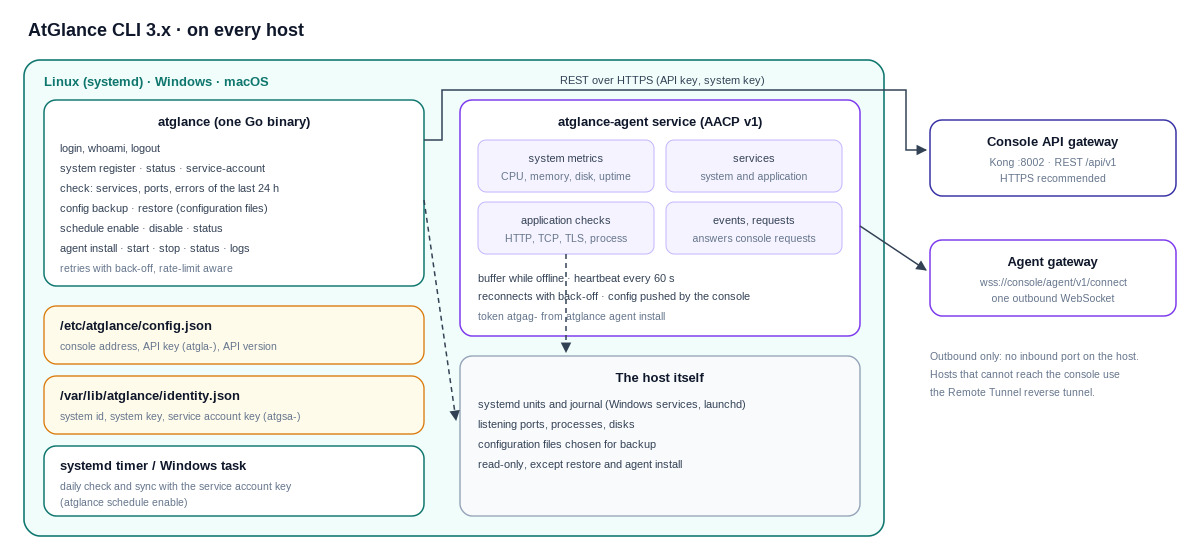
atglance |
One binary for Linux (systemd), Windows and macOS: login, system register, health check of the host's services, configuration backup and restore, schedule, and the agent commands |
| Settings | /etc/atglance/config.json: the console address and the API key (atgla-) |
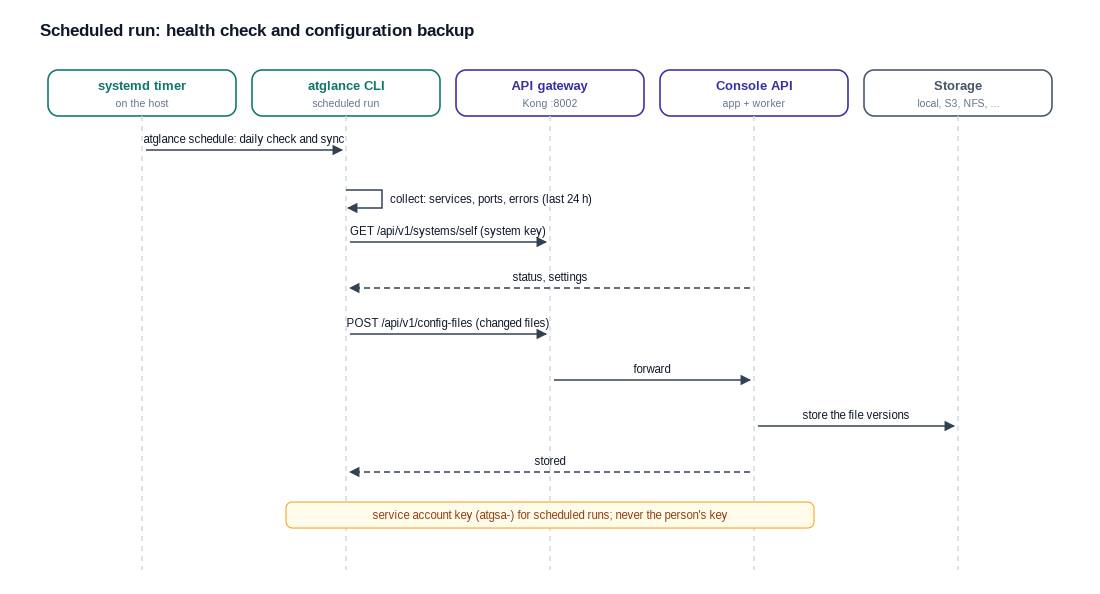
| Identity | /var/lib/atglance/identity.json: the system id and system key from registration, and the service account key (atgsa-) for scheduled runs |
| Schedule | A systemd timer (Windows: a scheduled task) runs the daily check and sync |
| Agent | The atglance-agent service for live monitoring: system metrics, services, application checks (HTTP, TCP, TLS, process), events and requests from the console. It buffers while offline and reconnects by itself |
The CLI reads the host; it changes it only for restore and agent install.
How they work together
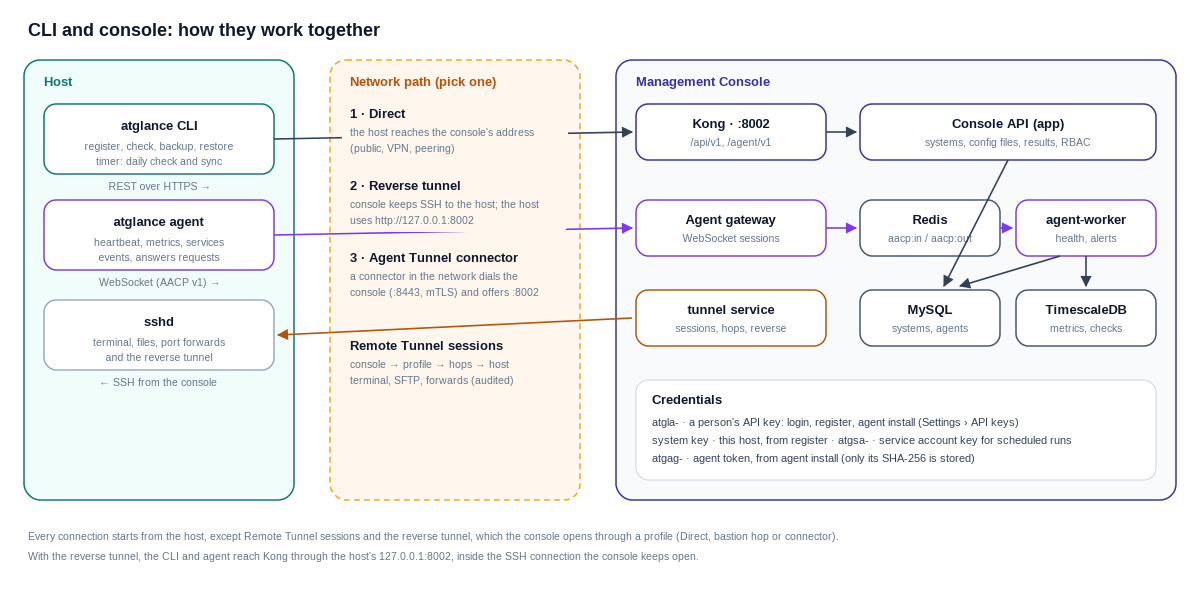
Network paths from a server to the console:
- Direct: the server reaches the console's address (public, VPN, peering).
- Reverse tunnel: the console keeps an SSH connection to the server and offers itself on the server's
127.0.0.1:8002. See Reverse tunnel. - Agent Tunnel connector: a connector in the server's network dials the console and offers it there. See Agent Tunnel setup.
Credentials:
| Credential | Who has it | Used for |
|---|---|---|
API key atgla- |
a person (Settings › API keys) | atglance login, system register, agent install |
| System key | the host, from registration | the host's own calls (status, configuration files) |
Service account key atgsa- |
the host, for scheduled runs | the daily check and sync, without a person's key |
Agent token atgag- |
the agent, from agent install |
the WebSocket; the console keeps only its SHA-256 |
Sequences
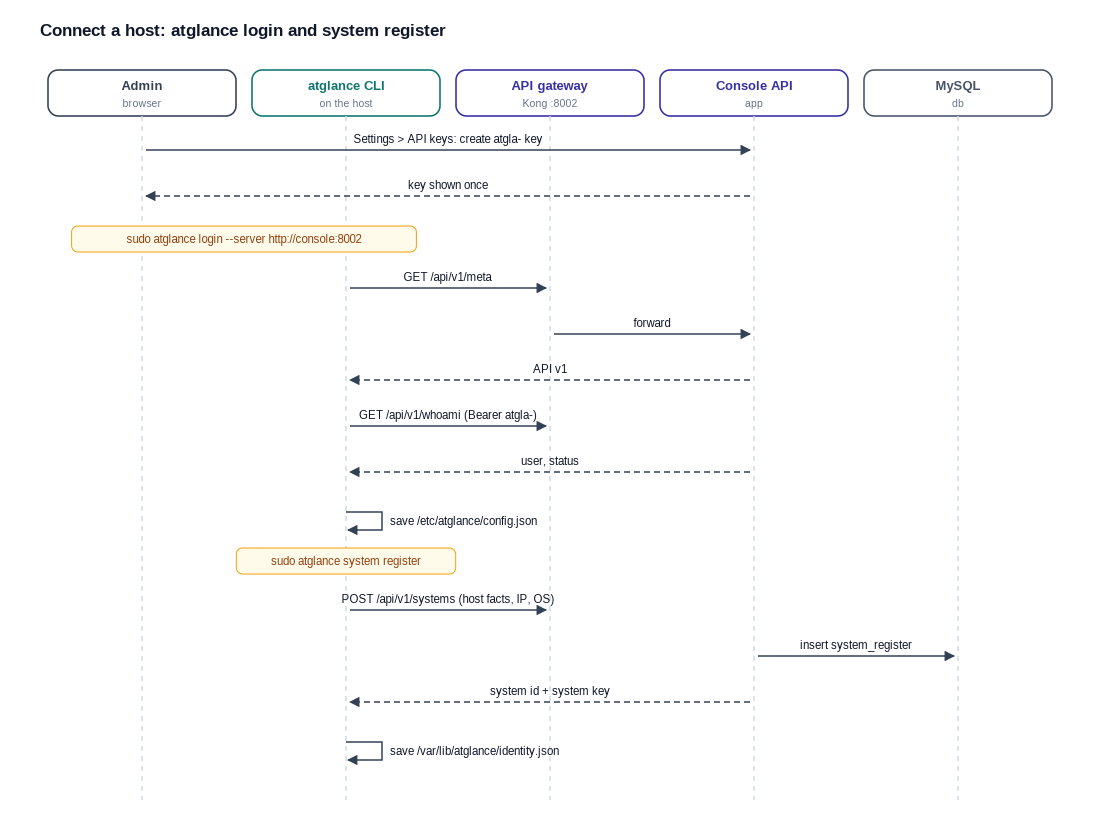
Connect a host
Scheduled run
Live monitoring
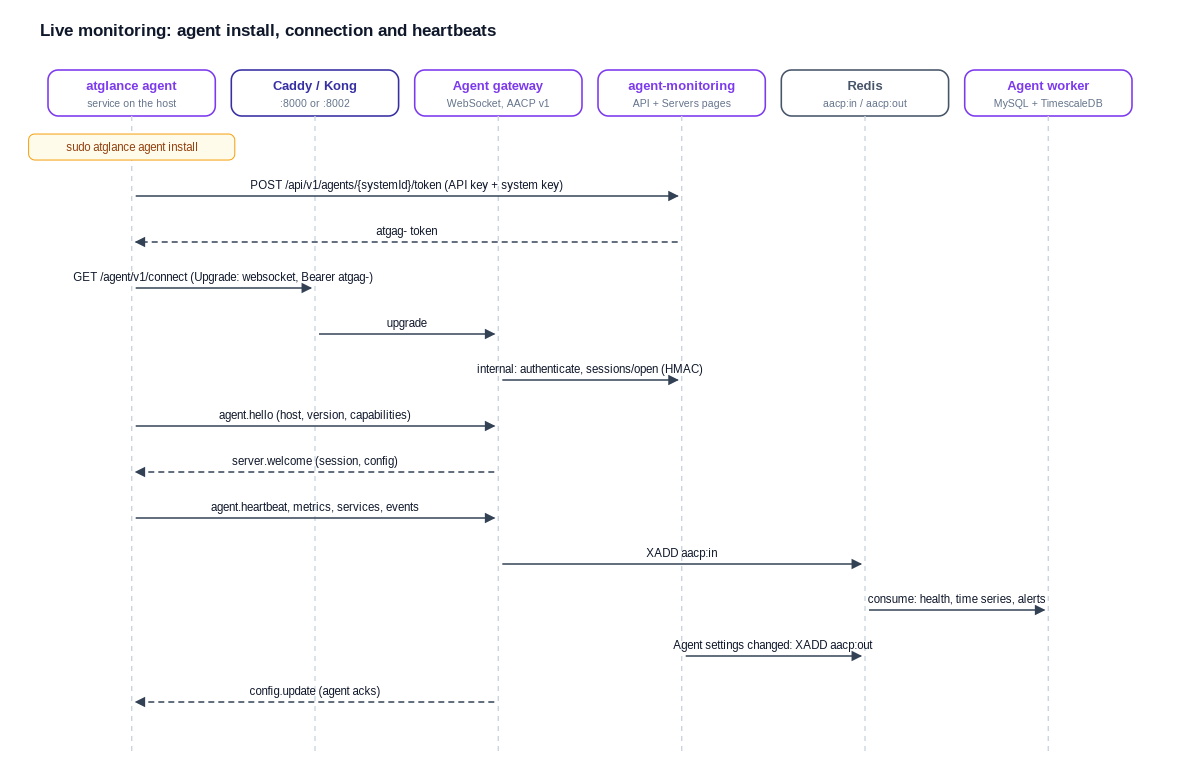
The agent speaks AACP v1 over the WebSocket. Heartbeats arrive every 60 seconds by default; a server is delayed after 90 seconds without one and offline after 180 seconds (Site Settings › Agents).
Remote Tunnel session
Security in short
- No inbound ports on servers: the CLI and the agent connect out; the console reaches servers only through Remote Tunnel profiles you create.
- Least privilege between containers: only the controller holds the Docker socket, and it answers a fixed list of calls. Internal APIs between containers are signed (HMAC).
- Secrets: stored encrypted with
APP_KEY; API keys and agent tokens are kept as hashes. - Roles: administrators, workspace admins and users; workspaces separate teams and their systems.
- Audit: sign-ins, changes, Remote Tunnel sessions and file transfers are in the activity log.
See also: Self-hosting, CLI reference, Set up Agent Monitoring, Remote Tunnel.