
Product
Two surfaces. One source of truth.
AtGlance gives operations teams a single, auditable surface for service inventory and configuration — without forcing your data outside your boundary.
CLI agent
Runs on every host. Reads systemd, journalctl, ss/netstat. Writes config backups. Talks to the REST API over HTTPS using a PAT token.
- ·
--system-register / --restore -f/--file - ·
--system-deregister[-force] - ·
--system-reactivate[-force] - ·
--show-my-services, --app <svc> - ·
--config-show, --config-import - ·
watch [--interval], export --format json
Management Console
Application + REST API + database + cache. Deploy on-prem, in your VPC, or hybrid. RBAC, dashboards, configuration history.
- · Web UI for admin/user/superadmin
- · REST APIs behind a declarative, DB-less gateway
- · Queue workers with retry/backoff
- · DatabaseCircuitBreaker middleware
- · File storage: local or S3
- · SSO providers: GitHub, Azure AD, Okta, Auth0, Google
End-to-end
How they fit together
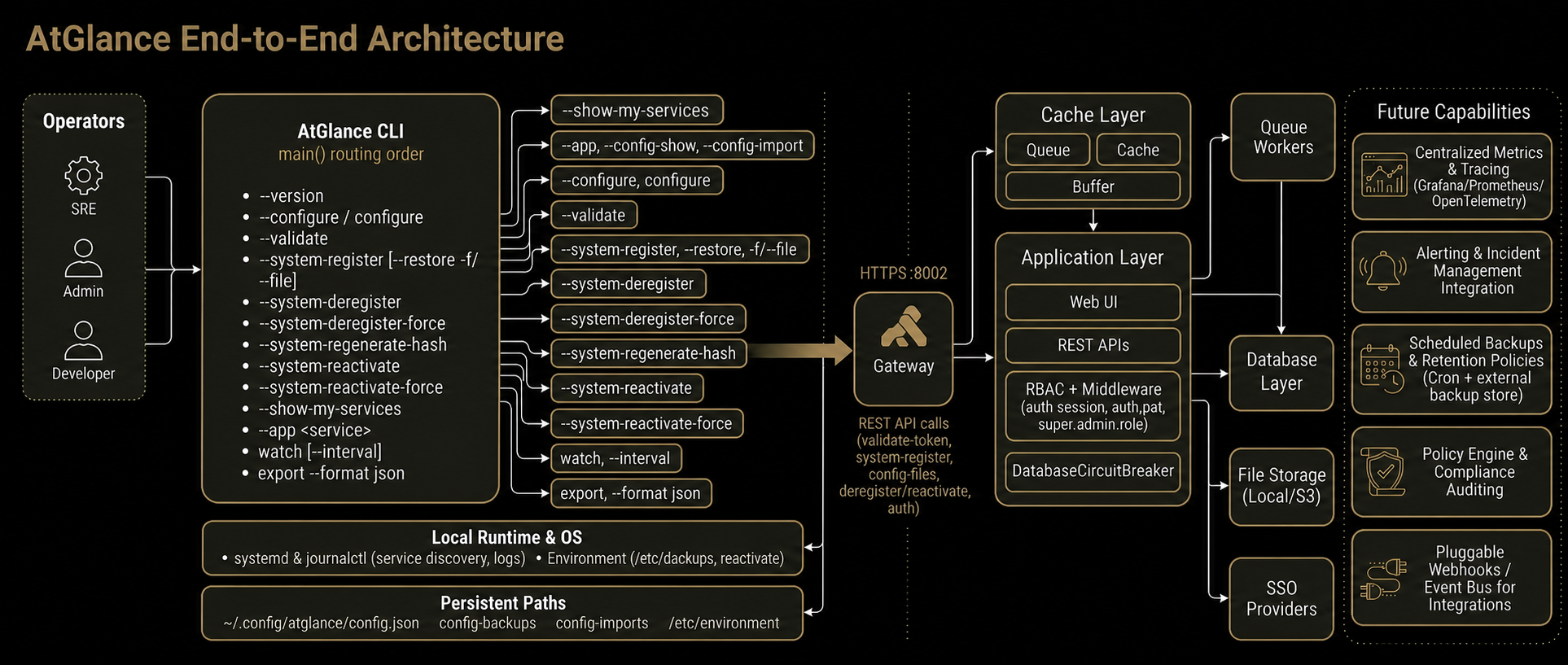
System lifecycle
Register · Deregister · Reactivate
A safe, idempotent flow for every host.
-
STEP 01registeratglance --system-register hashes /etc/environment and registers org+system.
-
STEP 02watch & syncatglance watch streams services and ports. Configs are saved as backups.
-
STEP 03deregister--system-deregister soft-decommissions; -force removes the system_id.
-
STEP 04reactivate--system-reactivate brings the host back without losing identity.
Sample
A few lines to get going.
Configuration lives in ~/.config/atglance/config.json.
bash
curl -fsSL https://app.atglance.live/cli/atglance-installer.sh | sudo bash
sudo atglance --configure
sudo atglance --system-register
sudo atglance --validate
sudo atglance --show-my-services